Pages

Tuesday, January 12, 2016

Displaying python output with GeekTool

Living in Michigan, we are often hit with snow storms that cause us conditions to be too dangerous for driving to school.  These 'snowdays' are great, and every morning when the possibility of a snowday is present, I will often find myself checking our local news website to see if our schools name appears.  This often involves refreshing the website every few minutes (or even seconds! #fingercrossed) during the crucial minutes before I need to take a shower and get in the car or get back into bed.

So the other day when I was doing some web-scraping programming, the idea occurred to me to automate this process, so that I don't have to keep pressing refresh.  So I wrote a little python program that opened up the website, searched the html code for Kent county schools, and outputted the results.  This was the hard part, and one I'm not prepared to fully explain today.

Once I got the program printing what I wanted, I opened up GeekTool.  GeekTool is a mac program that allows you to display words, bits of code, website data, computer data, images, etc. on the background of your desktop.  You'll have to see for yourself various things it can do.

Anyhow, creating a shell geeklet with the following code will cause that python program to run and its output to show up on the computers desktop:
python ~/Documents/script/webscraper.py
In this case, webscaper.py was the name of the program I created -- but you could put the name of any python program there. Then one of the options you can set in GeekTool is how often this program refreshes itself, so I set mine for 60sec. The results:
For a half-hour this morning I sat and read the Bible, sipping coffee, and every 60secs or so looked up and watched as the list populated itself and grew automatically.  And, since you're reading this, eventually I did see my school's name pop up.  Unfortunately, the coffee had done its work and I couldn't fall back asleep.

By the way, the picture of the radar was also self refreshing -- every 300 seconds (5 minutes) GeekTools would fetch the image url, download the image and update my background.  

Apart from being able to be lazier than normal on a snowday morning, I will say there was an additional benefit to all this work.  By fetching it this way, I actually found out about my snowday 2 minutes faster than I would have otherwise (we receive text messages from remind), and my background was always a few schools ahead of the website the normal way through a browser and many schools ahead of perusing the website through their mobile app.

Next steps are to get my computer to check for my school, and automatically turn my alarm on/off based on whether the name shows up....    

Accessing Python Functions in Quicksilver

Over the last two years, I have been programming a lot with Python.  I have developed a lot of functions to do various mathematical tasks. For instance, I have a function that takes a number and spits out a list of its factors:
factors(30) = [1, 2, 3, 5, 6, 10, 15, 30]

And I have another that gives me the prime factorization of a number:
primefactorization(400) = [2, 2, 2, 2, 5, 5]

These have been very helpful as I have created other programs, and as I have participated in the EulerProject -- a set of mathematical challenges that typically require the user to create a program that helps solve them.  As I try to complete more and more challenges, my collection of useful functions grows and grows.

Recently, I have tried to find a way to access these functions more quickly.  Previously, I would have to find them in the correct program file, open it up, tweak it a little bit to call the function with the specifics of what I was looking for, and then run the program.  Annoyingly many steps, in my opinion, and usually hard enough to deter me from using my own work and find an answer another way, or give up entirely.

However, I found a way to use Quicksilver to access these functions, inspired by a friends QuicksilverPythonTodoList program. He uses Quicksilver, as I do, to easily find and open programs and files on the mac, to move and copy files, to create qr codes, to search google, and many other things.  And he uses it to call up a python program and add items to a todo list by a simple keyboard command.  By pressing Cmd-Space, period, typing his todo item, pressing tab, and enter, quicksilver automatically opens up the correct python program, enters in the correct input, the python script runs which updates a text file, which is automatically saved and displayed on his background via GeekTool. All in the background, instantly (practically), at the press of a few simple buttons.  I wanted that too, for my mathematical functions.

So I gathered all my functions into one python module which I called euler.py and reading Brian's post on adding custom actions to quicksilver I set out to enable this for myself.  It took three steps, which I'll outline for you if you're interested yourselves:

Step 0: Install quicksilver and learn how to use the period to enter text entry mode. 
  1. Create a python module that has any desired functions all in one place.  Take note of the file name and path as you will need it later. Mine was ~/Documents/script/euler.py
  2. Use terminal to access that file and call up a function.  I had to use a -c switch with python to access my functions.  Something like:
        python -c "import euler; print euler.factors(30)"
    This is essentially a two-line program that imports my list of functions, and calls one of them specifically.  
  3. Write an applescript file that calls this terminal command.  In order for quicksilver to recognize it, you'll need to save this applescript file in ~/Library/Application Support/QuickSilver/Actions and then restart QS.  I created an applescript named DoMath.
    using terms from application 'Quicksilver' on process text theText set results to do shel script 'cd ~/Documents/script; python -c "import euler; print euler." & theText & "'" return results end process text end using terms from
Now I can access my files by the following keystrokes:
cmd space, period, type my functions name, tab, type domath, enter.


Having a heavy interest in cryptography, I also took many of the functions I wrote to encipher and decipher messages and set it up to be done the same way.  So now:
cmd space, period, CaesarShift("hello world") tab encoder instantly produces Khoor zruog.  

I have one improvement I'd like to do -- but not sure how to quite yet.  I'd like to be able to have it save the results to the clipboard automatically.  I'm sure that's possible with an additional tweak of the DoMath and Encoder applescripts -- but that's a learning project for another day.

Wednesday, June 24, 2015

Factoring Puzzles

Here are a few examples of factoring puzzles:
Here's the same set up for factoring a trinomial.

Factoring with a > 1 is not much harder, when students remember to find factors of ac that add up to b. Those become the insides of this table, and factoring out GCF's leads to the outsides, and the final factors. 

You may download worksheets here.
Worksheet - Table Puzzles (Multiplication)
Worksheet - Table Puzzles (Factoring)

My recorded lessons for these ideas can be found here:
   Lesson 5a: Factoring Quadratic Expressions into Binomials
   Lesson 5b: Table Puzzles (and Dividing Polynomials)
   Lesson 5c: Factoring Trinomials

Friday, June 12, 2015

Inserting mathematical equations using Latex into Blogger posts


To enter in equations in Blogger posts, try copying the following code into HTML mode at the beginning of your post:

<script type="text/x-mathjax-config">   MathJax.Hub.Config({tex2jax: {inlineMath: [['$','$'], ['\\(','\\)']]}}); </script> <script src="http://cdn.mathjax.org/mathjax/latest/MathJax.js?config=TeX-AMS-MML_HTMLorMML" type="text/javascript"> </script>

Then switch to compose mode and you can type equations using latex surrounded by single dollar signs and the equations will display properly when published.  For instance, I typed the following:

  Einstein's famous equation was $E=mc^2$.
  The definition of a derivative is $\lim_{h\to0} \frac{f(x+h)-f(x)}{h}$.
  The definition of a derivative is $$\lim_{h\to0} \frac{f(x+h)-f(x)}{h}$$

And this is what displayed:
  Einstein's famous equation was $E=mc^2$.
  The definition of a derivative is $\lim_{h\to0} \frac{f(x+h)-f(x)}{h}$.
  The definition of a derivative is $$\lim_{h\to0} \frac{f(x+h)-f(x)}{h}$$

It appears single dollar signs are for inline equations and double dollar signs are separate centered equations.

I am not an expert in latex, blogger, or html.  I published this article more for my own future reference then as an instruction manual for everyone else, so you can complain in the comments that it didn't work for you if you'd like, but I'm not going to be able to help you fix it.  I learned this information primarily through Steve Holden's Blog.

Tuesday, December 30, 2014

New Years Goals Jar

It's that time again!  During the last week of last year, my wife and I set up a bowl and a set of papers similar to the picture above.  Then, any time during the week that either of us had any inspiration, dreams, or goals for things to accomplish during the year, we wrote them down. On New Years Day (or sometime close to then) we had a date night and read through all of them together.  Some of them were simple, some were outrageous, some were jokes, some quite serious.  It was a great hour of conversation (in Burger King... classy I know!).


Here are a few of the goals we set at the beginning of last year that we've met (or attempted) as a result of our conversation that day:
  • Budget each month: It has been so helpful to come together twice a month to get on the same plan about money. As a month comes to a close, we are able to look at what we've spent or not -- save for Christmas, etc. Without this, it would have been impossible to...
    • Buy a bed for the girls room
    • Send out Christmas Cards
    • Buy a freezer to have freezer-meals (didn't quite accomplish, but should occur early in 2015)

  • Create a CD: One of my favorite accomplishments of 2014 was finally recording a CD of my own music, written for our church. By using garage band, I was able to layer together several tracks worth of vocals and guitars and self-produce the CD: Oaks of Righteousness, which you can download for free.

  • Concert:  Another goal of ours was to host a concert of our favorite family-oriented songs, which we were able to do in July. Belding offered us a spot on their Thursday night "Music in the Park" series, where we were able to perform a set of country songs.  


  • Start Recycling
  • "Bread"-ruary:  Our initial dream was to simply go one month with only creating fresh bread - not buying any. After successfully going through February, we continued on into March, and now ten months later, still make our own bread each week. I don't think it's saved us any money, but it sure tastes good, and with an electric Breadmaker, it's not time consuming either.
  • Have a garage sale
  • Not have another kid (YET): I hesitated to even include this, but with couples all around us expecting in 2015, and this being such a publicly stated goal in our small groups and circle of friends, I was afraid if I left it out people might think we were making an announcement or something.  The exact wording of the goal was "Enter and leave 2014 with two kids", a sort of joke that we wouldn't lose any kids along the way either.  I'm happy to say that despite Carrie picking up more hours at the library and also 8 hours a week at church, I haven't lost any kids in the extra hours of daddy-daughter time.
Granted, there were some goals on the list that haven't been accomplished. They won't automatically become goals for next year, as I think it's important to reevaluate and dream again.  But overall, the process of dreaming together as husband and wife was valuable last year, and one we are planning to do this year too.  Eventually, I hope the whole family will get involved too.

What do you hope to accomplish in 2015?

Monday, December 29, 2014

Physics of Bandaloop Dancer

The other day, I was shown a video of one of the most exciting looking things I've seen in some time:
 

The group of dancers is called Bandaloop and among other things, they dance on the sides of buildings and cliffs by being attached via rappelling ropes. The long ropes keep them from falling, and allow them to make incredible leaps with long hang times.  A video interviewing the founder says some days, from tall buildings, she can get jumps with hangtimes of 9 seconds or more. 

My first reaction to the video was "WOW! I wanna do that!".  My second reaction was "What's the physics behind that?  Nine second hangtimes? Really?!"  

Since I can't try that anytime too soon, I must instead attempt to describe the physics behind them. Here are the pictures I drew on the side of the napkin:

I didn't have lots of data to go on, so I initially estimated that the Length of the ropes (L) might be approximately 30m, and if harnessed at the center of the body, that puts x at approximately 1m.  At best jump, I estimated approximately 5m out from the building. Since the sin of the angle θ is x/L, the inverse sine of 1/30 and 5/30 suggests that θ ranges between 2 to 10 degrees. At angles this small, sin(θ) and tan(θ) are nearly identical, suggesting that y and L are nearly identical too, and I'll be interchanging them occasionally. This is not true as the rope gets smaller -- so relatively tall buildings and tall cliffs are important.

Next I drew a free body diagram of the forces acting on the dancers as they are away from the building.  There are primarily two forces acting on the dancer -- Weight pulling the dancer down, and tension in the ropes pulling the dancer at angle θ up and in toward the building.  That angled force I broke into components Tx acting in towards the building, and Ty acting to counteract the dancers weight.  Because the ropes are so long, the height of the dancer doesn't change significantly, and since the dancer isn't really moving much vertically, we can say that the forces are balanced vertically.  That is, W = Ty. Since W = mg, this means Ty = mg.

Horizontally, the forces aren't balanced, and so whenever the dancer is in the air, there is a portion of the tension Tx which acts to pull the dancer back in toward the building. This unbalanced force is a net force, and so we can write another equation: Fnet = Tx. Since Fnet = ma, this means Tx = ma.

Finally, Tx and Ty are related to the angle by the tangent relationship, such that tan(θ) = Tx/Ty, and after multiplying, Tx = Ty*tan(θ).

After a few substitutions and a little division, we find a formula for the acceleration inwards toward the building that the dancers feel:
It's surprisingly simple and clean -- the acceleration the dancers feel is just a multiple of gravity. Since θ ranges from 2 to 10 degrees, the dancers feel acceleration toward the building ranging between approximately 1/30th to 1/6th that of normal gravity.  For comparisons sake, the acceleration of gravity on the moon is about a 1/6th of that on earth, which according to my rough estimates is about the most that the dancers would feel inward toward the building on their most extreme jumps. Most of the time they are just a meter or two away from the the wall they are feeling much lower attraction toward earth.  

Put another way, the dancers feel approximately 1/30th of their "weight" inward toward the wall, so a 120lb dancer might feel only 4 lbs of forces inward. Imagine how easy it would be to jump if you only weighed 4 lbs, but had the strength of a professional dancer!

Which suggests a different approach to this problem. Let's figure out how far out from the building a dancer ought to be able to get, assuming they can jump "off the wall" with as much speed as they can normally jump off the ground.... Assuming that a person can normally jump to a height of 0.5 meters under typical gravitational acceleration of -9.8 m/s/s, we can use the "no time" formula:
They would have to jump at a velocity of approximately 3 m/s, yielding a hang time of approximately:
 
Leaping with the same initial speed (3 m/s) off the side of the building with an acceleration of 1/6th of gravity as these dancers feel would allow them hang times of 6 times as much:
  

Not quite the 9 seconds claimed in the video, but more on that later.  Substituting half of this time (because the maximum height occurs halfway into the trip) into the kinematics equation allows us to calculate the maximum "height" off the buildings this dancer could reach:
That's pretty close to the 5m I estimated from the video.

Now the hangtime of 3.7 seconds is far less then the the claimed 9 seconds of hangtime, and even my closer observation of the video suggests a few jumps were more than 5 seconds long. One way to get more hangtime is to jump with more speed - something that's quite possible with stronger and trained legs. Remember I started with someone able to jump 0.5 meters -- and I'm sure a strong dancer could leap higher. 

Another reason the kinematics equations don't give us enough hangtime is that the acceleration is not constantly 1/6th that of gravity -- often it's way less than that even! Smaller accelerations, like those felt close to the building when θ is small, would increase hangtime significantly. Unfortunately, I've forgotten the formulas for how to deal with accelerations that aren't constant -- although I'm sure a few google searches could refresh me. 

Either way, the Bandaloopers certainly can experience tremendous "jumps" due to the low horizontal forces they have to fight on their rotated worlds, and simple first-year physics concepts help reveal why.  

Now, perhaps someday I'll be able to actually try it for myself.   

Lesson Planning with Google Calendar


I've done lesson planning about a dozen different ways in my 10 years of teaching - and my favorite and current way of planning is by using the Calendar application. As you can see in the picture, each activity for a given day is one of the pink boxes that shows up. In these boxes (technically they are "events") I can write as little or as much detail as I want.  Typically I just write a little bit: "Notes on Solving by Quadratic Formula" for instance. For assignments I write something simple like "Assign: Pg 189 #1, 2, 10-26evens" or "Assign: Worksheet - Multiplication".

These calendars are super easy to move items around, copy from year to year, assign over multiple days, etc. I have created four Google calendars, one for each class that I teach. These Google calendars then can be embedded into my class website.  Then students and parents can know at a glance what were studying not only this week, but they can look forward to days when they may be gone, or look back to days they've missed.  I have had on more than one occasion students who have come in after being sick and instead of asking "did I miss anything" they hand me their homework which they found on the calendar.

Whenever possible, I put links to helpful material into these events as well. This was the biggest challenge, but something a little html knowledge proves handy for. To add a link to something, you double click on the event and type into the "Add a note" section. You may type text descriptions with more details here and students will be able to read these by clicking for more details on their calendars.  Adding URL's sounds easy at first, but unfortunately, simply pasting a link into the "Add URL" section doesn't work. Perhaps this will be fixed someday? A work around that allows a clickable link to appear on the student end of things is to use a little HTML code. Copy and paste following code snippit:
  <a href = "URLgoeshere">Text goes here</a>
One thing to look out for is to make sure that your computer doesn't turn " into "smart quotes" -- because then the links won't work. I had to turn "smart quotes" off in system preferences. In addition to downloadable worksheets as assignments, I include links to quizlet vocabulary practice, math practice websites like ThatQuiz, or videos of my lessons whenever they are available.  A colleague of mine records every lesson every day, and since this year we share Algebra 2 together, I include links to her videos on youtube. I tell the students that if they don't like the way I explain something, or if they need another explanation, they can check the calendar and find Mrs. Straayer's videos.

One last plug for planning with google calendars is that students and parents can subscribe to them, and then they can have them show up on either their computers or phones. Anytime I make an update, they will have access to the most up to date plans.  This is really convenient when a snow day or something arises -- I can simply cut and paste today's events to tomorrow.  I have mine connected to my phone so I can either see what's coming up from anywhere -- or add a note or link or change something from everywhere on my phone.

QR Codes on Worksheets

Within the last year or so, I have been making efforts to include QR codes on my handouts in my classes:
Example of a QR Code:
If you scan this with your phone,
it will tell you that it's an example of a QR code.
For  those of you who don't know, a QR code stands for Quick Response code. You scan it with an app on your phone or tablet, and depending on what's encoded, stuff happens. The example above simply shows some text. Most often, a QR code is linked with a website -- and you see them all over the place from political brochures to labels in the supermarket. My wife has used QR codes to create scavenger hunts for her students that visit at the library. You can even set them up to automatically write a text for you as my step-sister did for me for those days when the girls get a little out of control:
Mom Meter:
Scan the appropriate QR code and mom receives a text like:
"come home soon dad is going to kill us!"
About a year ago I started putting them on the worksheets and notes packets I would give to my students.  It only takes up a little space in one of the corners somewhere.  Usually these are simply connected to a pdf of the document that they can view on their phone or tablet. Most of the time these files have the original blank copy of the document, as well as an answer key. My philosophy on homework is that it is practice -- and I want my students to have good practice -- not blind practice. We talk often throughout the year that they need to know whether they are doing things right, so that they don't practice mistakes and learn bad habits.

Here's how I do it:

Right-clicking files in your dropbox folder
gives you a URL link to download that file
First, I use Dropbox for all my file storage, and one of the features of Dropbox that I use most is the ability to get a sharable link to every document by simply right-clicking. I put these links on my Google Calendar, on my class website, and of course, in the QR Codes. You can create a QR code for free at a bunch of online sites such as QRStuff or QRCodeGenerator. Simply paste the link into the websites and copy the image to place it into a document.

Creating a QR Code in Quicksilver
That was too much work for me though, so I quickly learned that my favorite program Quicksilver had a QR Code generator available. If you have Quicksilver, you can simply paste the link in the first pane and choose the CopyQRCode action in the second pane and viola - you have a paste-able QR code that can be put into any program. After setting it up with it's own trigger, it literally takes me 1 second to create a QR code for a URL that i've copied onto the clipboard. For more tips on setting this up, check back later for another article.

Saturday, December 27, 2014

Beauty In Polar Coordinates

This post is a part of a series of guest-posts on polar coordinates and complex numbers. These posts were written by my pre-calc students:


Beauty in Polar Coordinates
by Luke VanDyke

Beauty can be found in mathematics in various places. Whether it be in Euler’s Identity or another beautiful equation of the sort, or in a magnificent graph, order and beauty are found on every page. One of the most interesting and amazing ways to graph objects is in polar form. A variety of shapes such as spirals, cardioids, and limaçon are just a few examples of the wide range of beauty found in graphing in the polar form. I think one of the most amazing curves that you can graph is the rose. Using Geogebra, I was able to explore in great deal the immense complexity of such an amazing curve and also notice several key patterns regarding the equation.


In order to fully demonstrate the beauty of the rose, I first inserted two sliders, a and b. I made the range for each slider from 0-10 with increments of .1. These sliders would serve as my values for a and n. The equation we learned in class (r=a*cos(nθ) and r=a*sin(θ)) must be changed into the curve expression on Geogebra. Mr. Roer helped me out a lot in converting to curve form. Once I had the equation in, I was able to play with the sliders and see how they worked. Slider A adjusts the size of the radius. The larger the number on the slider, the larger the rose will “grow”.


Slider B was a lot of fun to play with. Slider B adjusted the number and also the width of the “petals”. After playing around with both sliders, I noticed a pattern developing that affected the graph significantly. When the value of slider B was odd(let’s call this value x), the flower would have x number of petals. For example, if Slider B=1, there was just one circle. The same occurred for all other odd values between 0-10. On the other hand, even numbers also had an interesting pattern. For every even value between 0-10(we’ll call this value y), there would be 2y number of petals. For example, if 2 was the value on the B slider, the rose would have 4 petals.


This project was a really great opportunity to see God’s beauty as seen in mathematics. The saying “Out of intense complexities, intense simplicities emerge.” really goes hand in hand with this project. Once you put in the big, complex equation, a simplistic, beautiful image of a rose emerges. This saying also applies to roses in real life. Out of a complex equation of photosynthesis and many other factors, a beautiful flower emerges. There are many other examples all throughout God’s magnificent creation. Whether it be in the majestic landscapes throughout nature or in the complexity of infinitesimal human DNA and genetics, God’s awesome handiwork is seen all throughout the earth. Through this project, I’ve been able to reflect on how great God is and how everything in His creation is simply remarkable, even in places where you least expect it.

Friday, December 26, 2014

Customized Morse Code Vibration Text Alerts

So, have you ever felt your butt vibrate and thought -- hmm, I got a text.  Who is it from?  Do I need to check it right now and risk getting:
  a.) caught by my teacher
  b.) caught by my kids
  c.) caught by the others in the meeting?
Wouldn't it be nice to know who's it from at least?

The other day I was playing with settings on my new phone and found the solution.  I noticed that I could create my own custom vibration patterns. You can also assign different vibrations to texts received from different people. Some how inspiration struck to assign my top texting contacts each a unique vibration pattern.

Unfortunately, there weren't very many vibrations patterns to choose from, until I saw that I could create my own -- and then I decided I would use Morse Code with my contacts initials, so I could know who was texting.

Here's a picture of morse code if you don't already have it memorized. I don't have all of it memorized by the way -- but I know many of them.  I found it helpful at first to learn key words to help me memorized the dots and dashes.  CAL-i-FORN-ia for instance helped me remember C's pattern of -.-.

To create a personalized vibration pattern on an iPhone:
  1. Create the vibration pattern:
      -->Settings-->Ring Tone (Or Text Tone) --> Vibration --> Create New Vibration

      Then tap out the pattern you'd like. It does't have to be Morse Code -- I just found that convenient and cool, so I used that. For people that text you regularly, I would recommend something short -- for my wife, I at first had her whole name -- but that got annoying really quick when my butt would vibrate for three or four seconds whenever she texted.  Now it's just C:  -.-.

  2. Assign it to a particular contact
     -->Contacts-->Find the persons name
     OR -->Search for their name.
    Then edit and look for Text Tone and Vibration.

You can assign different text tones for different people here -- which is the sound it makes when they text you.  Since my phone is almost always on vibrate though, I don't bother to do that. 

Saturday, November 29, 2014

Confessions from the Litter Box

Today, as I was doing the weekly chore of emptying the litter box, I heard my older daughter misbehaving and yelling and screaming at her little sister. Usually I would punish her, or yell back (which is totally acceptable and non-hypocritical response to "Don't yell at your sister!" right?). This time I was able to calmly go inside and invite Abby outside (which took forever as she had to find a coat, hat, mittens, boots, etc.)

Then Abby learned how to sift the litter box. She learned how to dig for poop, shake out the dirt, and the dump the poop into the bucket. She worked it for a few minutes while we talked, and then eventually I took over and finished for her. She even said "This is fun!".  Not exactly my first thoughts while doing it. Not exactly what I had hoped for with a "punishment". I thought the best thing that she could do while being selfish was to do something for someone else -- but she shouldn't have fun doing it!

The conversation we had however was beautiful.  Here's my attempt at remembering:

Daddy:  "You know what I do whenever I do this Abby?"
Abby: "No, what daddy?"
D: I usually take this time to confess.
A: What's confess?
D: Confess is when you pray to God and tell him things that you did that were wrong. Things that you're sorry for."
A: Like yelling at my sister?
D: Yep.
A: Dear God, I'm sorry for yelling at my sister, do you forgive me?
D: That's perfect bud! Now, usually you aren't going to hear God say "I forgive you" but he always does.
D: Do you have anything else you want to confess?
A: Not today. I didn't do anything else bad today.
D: [laughs]

Later:

A: It's stinky.
D: That's why we do this every week.  If we don't do this every week, it gets really stinky.
A: Yeah. Ninja pees a lot.
D: Yep, and Sammy too. It happens. That doesn't make them bad kittys (except when they don't do it in the litter box, right?!)
A: Yea. They should say they're sorry!
D: Well, we do bad things every day too.  We should try to confess right away. You should probably do it every day, or else we have stinky days.

Not sure if any of this is going to stick -- we'll see.  But hopefully this little lesson sticks a little.  And if nothing else, I might be able to pass one more chore off on the girls.

Saturday, June 22, 2013

Conjunction Junction - Wait, what's conjunction?

The other night as we drove home late from softball, my wife started asking me a few questions about astronomy terms, and so I thought I might write down a few of them.

  • Conjunction: A conjunction is when two (or rarely three or more) objects are close together in the sky.  This is typically spoken of in terms of the planets. For instance, just this week Mercury and Venus experienced conjunction, and were very close in the sky.  With so many moving objects in the sky, a conjunction of some sort occurs just about every month -- and certainly so if you include the moon as one of the objects 
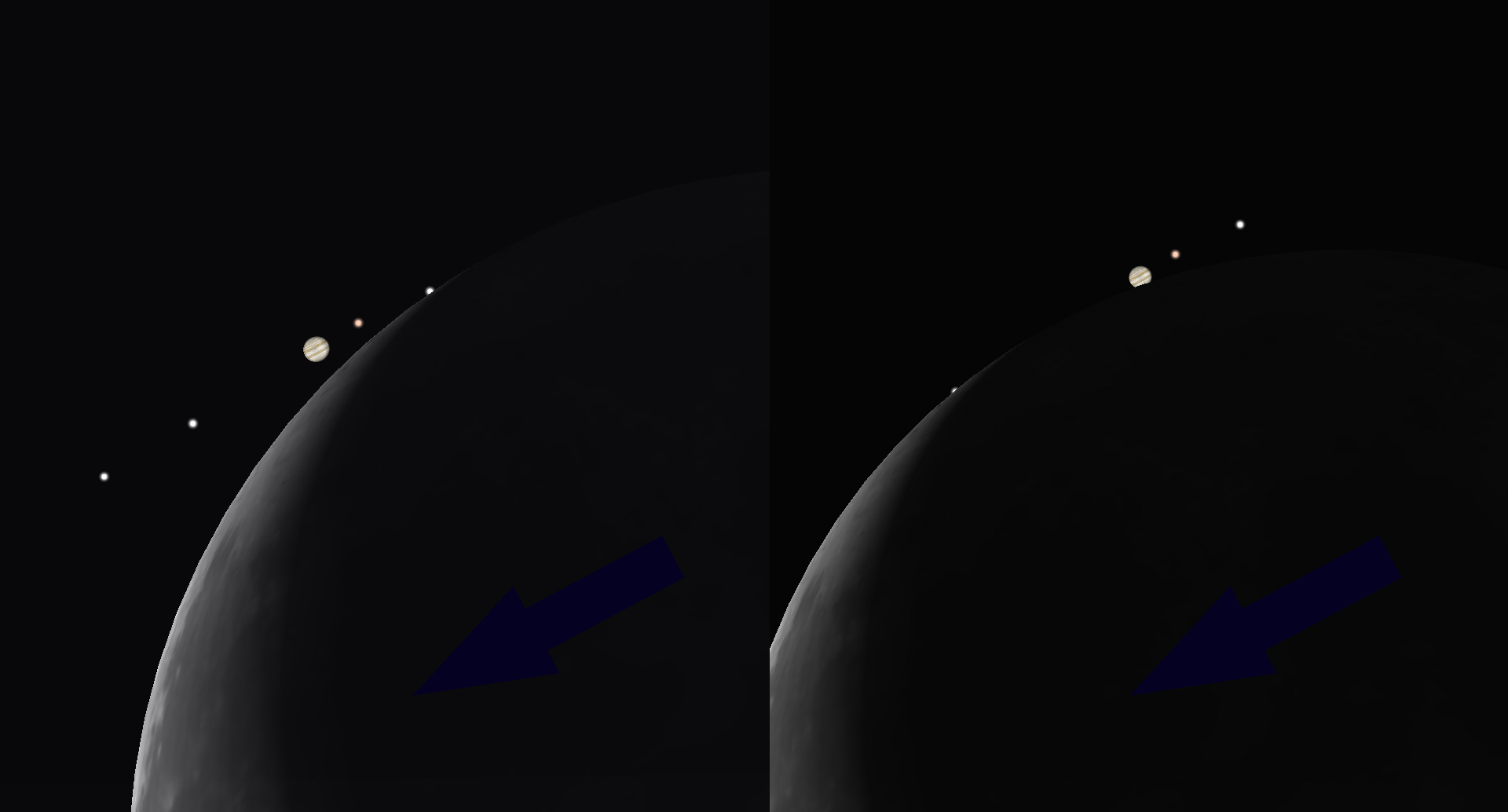
Jupiter and it's moons
 "being occulted"?
(I don't think that's proper English)
    • Occultation: A very special conjunction where objects appear so close together in the sky that one object actually passes behind another. The most common types are when the moon passes in front of some object, and for a short time, that object is hidden behind it. I have never had a chance to observe this. Here is a list of lunar occultations for this year and you can see that the moon passes in front of stars all the time (nearly every day) but in front of major planets only a few times. And during those times, you can only see the occultations from generally small locations on earth. 
    • Transit: A transit is another type of conjunction, when a smaller object moves in front of another bigger object. The most famous transit is when Venus transits the sun, an event that occurs twice every 120 years or so. The most recent was June 5, 2012, so I'm sorry -- if you didn't see it then, you probably won't see it ever.  I made sure to watch it, and took this picture. The transits of Venus in 1639, 1761 and 1769 are of historical interest, because they helped scientists get an accurate measure of the distance from the earth to the sun.
    • Syzygy: This is just too cool of a word to leave out, even though I've never seen it written anywhere except in a glossary of astronomical terms. It's a great Scrabble word, worth 25 points, for those rare (impossible actually) occasions when you have 3 y's.  Essentially, a syzygy is whenever three astronomical objects are all in a line.
    • Eclipse: An eclipse is when the sun, moon, and earth are in syzygy -- and depending on the order of the three, and when the syzygy occurs, you might experience an eclipse.  Every 14.5 days the three are aligned in some way, but most of the time the moon is slightly above or below perfect alignment, and so only a handful of times each year does some kind of an eclipse occur.  Here's the next ten years of eclipses.  The next total solar eclipse that will be fully visible in the North America will be on August 21, 2017, an event I'm planning on driving down to see. 
  • Opposition: When a planet is at opposition, that means it is on the opposite side of the earth from sun. This is for the planets further away from the sun then earth -- and is usually the best time to observe them.  The planet is usually the brightest then -- and highest in the sky (along the local meridian) at midnight.
  • Elongation: Elongation occurs for inferior planets (Venus and Mercury) and is when appears the farthest away from the sun. This marks the best times to observe Venus and Mercury -- when they are their brightest, and furthest away from the sun's blinding glare. 

Thursday, June 20, 2013

Welcome to the dark side -- here are your cookies...

...Aw man... why are they oatmeal raisin!? Gross!

So, I haven't written a ton in the last few months, because I've been a little overwhelmed.  Most of it was just normal, end-of-the-school-year busyness (business?) of trying to finish off four different classes and grade 140 exams.

But another overwhelming thing has been switching over to using a mac.  

You see, over spring break, my household computer died -- the hard drive completely crashed. Besides losing all my data, papers from classes, pictures and videos of our kids first two years of life, etc, it also meant I didn't have a way to work from home anymore. At the time, I was spending at least 10 hours a week doing something from home (mostly in the 4:30-6:00am time frame...).  Accomplishing this all at school would have been a difficult move.

Not sure if I agree -- it was just a cool picture
Fortunately, I was given a laptop to work with. The only thing was -- it was MacBook Pro. Our school is in the initial stages of a move toward 1:1 access (every student has their own computer) and the teacher's laptops had just come in. We were given our laptops with a simple suggestion: play with them.  Get familiar with them.  

I had no choice really, but to dive in pretty quickly. Fixing or replacing my windows machine was not in our financial budget, nor did my personal time budget have room to try to make repairs. So, I began doing everything I used to do on a brand new machine.

After 10 weeks, I can finally say that I like this new machine. I still find myself behaving at times as though I'm on a PC (I keep pressing "Alt F-S" to save something and otherwise trying to access the menubar) but I am getting used to many of the changes. I won't say that I like this machine better then a PC yet -- but at least I've stopped cursing under my breath as I use it. If I end up ever liking it better, it will probably be because of QuickSilver -- but that's another post for another day. 

More posts will follow, I promise -- but it's still slow going. 

Monday, June 17, 2013

Reflections/Refractions on a rainbow:


Today we had a thunderstorm roll through an hour before sunset, and afterward a beautiful, full, double rainbow appeared.  It was so beautiful that I woke my daughter Abby up (actually, she hadn't quite fallen asleep yet) to take her outside and see it.  After about one minute Abby became more fascinated in the neighbors dog, but still, she said it was pretty.

Afterward, I came in and by the time I had posted these pictures to facebook, everyone else had already posted pictures to facebook about the same rainbow.  It reminded me of the second to last page of my difficult physics exam this semester, which was all themed about different types of severe weather, such as the energy of a falling hailstone to the current in a lightning bolt and the centripetal force of cows stuck in a tornado.  At the end of the exam, I posted this page, reflecting on the promise God made to never again destroy the world with a flood.  In it, I describe how each one of us sees our own individual rainbow - a testament to the way that God gifts each one of us separately and uniquely.


A rainbow is God's sign that he provided to us as a reminder of his covenant to never again destroy all life with a flood. Though God is the speaker in Genesis 9:16, I like to claim the verse for myself that says: "Whenever the rainbow appears in the clouds, I will see it and remember the everlasting covenant between God and all living creatures of every kind on the earth." It reminds me that though the storms of life will come, my God will not let me go.

A rainbow is a consequence of light from the sun being refracted as it enters a water droplet, reflected off the back of the drop, and refracted again as it leaves. This refraction causes the light to split into different colors. Each droplet sends a specific wavelength of light back to your eyes, which you interpret as a specific color. The entire collection of water droplets in the sky, all producing different colors -- or, if you will, all singing different notes -- produces the symphony of light that you enjoy.

Even more amazing is the fact that the person right next you is experiencing their own unique rainbow, as the rays of light necessarily must travel at different angles to reach their eyes. Therefore, a droplet that you see as red, might be producing yellow for your neighbor, and a droplet they see as violet, you might not even see at all. 
Reflect (No pun intended. Ok, maybe a little.) on these thoughts for a moment, and then proceed to the final page to share some of your own thoughts from the entire year. If time allows, feel free to additionally share some of your own thoughts on rainbows on this page.

Saturday, April 6, 2013

How big a number is 400!


The other day I was teaching permutations to my Algebra 2 students, and casually asked how many different arrangements are there for our whole school body to be placed for a picture. I don't know the exact number, but I typically use 400 for estimates (yes -- I make enough estimates for our school that I have a "typical"). I knew immediately that the answer was 400! (which is 400*399*398*...*3*2*1 for those of you who have never seen the ! notation before).

My problem was that I had no concept of just how big 400! really was.  How many digits long is that number?

My initial thinking was to simply type it in the calculator, but it was too big for my TI-84 to handle.  That meant it was more than 100 digits long -- but is it more than 400 digits long? 1000 digits?  How can I answer this?

Eventually I think logarithms will be the answer, but for now let's see if we can set some upper and lower limits on things.  Since each of the digits in the multiplication from 400 down to 1 is less than 3 digits long, then the whole product must be less than 400*3 or 1200 digits long.  Since most of the digits are 2 or more digits long, it's safe to assume it must be more than 400 digits long, but just how many are there?

More formally:
   400! = 400*399*398*...*3*2*1 < 1000*1000*1000...  = 1000^400 = (10^3)^400 = 10^1200
   400! = 400*399*398*...*12*11*10! > 10*10*10*...*10*10*10! = (10^390)*10!

Now logarithms are a tool our PreCalc students will be tackling this next week, and could be used to answer this question, and it all hinges on the product - sum property of logarithms:
log_{10}X+log_{10}Y=log_{10}XY
A factorial is simply a lot of multiplications, which would translate into a giant sum of lots of logarithms:

That can be summarized (pun intended...) as:
This gives me something that my calculator CAN handle -- since instead of actually trying to display the number, it simply gives me the magnitude of the number. This can be typed into a TI-84 by typing:
  sum(seq(log(N),N,1,400)) = 868.8 
This means the number 400! is equal to 10^868.8 and is therefore 869 digits long.

A quick check on wolfram alpha verifies this:
(I'm sure some of you were asking "Why didn't he just do that in the first place?" to which I simply respond "Because I didn't have to! God gave me a brain and problem solving skills for a reason!")

As a follow up question -- can I predict how many zeroes are at the end of that number?  In factorials, zeroes come after every multiple of 5.  (Technically, I would need multiples of 2 as well, but there are plenty of those, and relatively fewer multiples of 5).  

Up to 4! there are no zeroes:
  1, 2, 6, 24, 
Between 5! and 9! there is 1 zero:
  120, 720, 5040, 40320, 362880
Between 10! and 14! there are 2 zeroes:
  3628800, 39916800, 479001600, 6227020800, 87178291200
After that my calculator can't display them properly, but I hope you'll anticipate the pattern.

400 is the 400/5 80th multiple of 5, and so 400! is the first factorial to have 80 zeroes at the end of it.  A not-so-quick check on Wolfram Alpha's picture reveals that there are actually 33*3 or 99 zeroes.  Extras!?

That's because there are more multiples of 5 -- 25, 50, 75, ... 400 each contain 2 factors of 5, and 125, 250, 375 each contain three.  Counting these all up should reveal 99 factors of 5 (and way more factors of 2):
  80 Multiples of 5: (5, 10, 15, ..., 390, 395, 400)
  16 Multiples of 25: (25, 50, 75, ... 350, 375, 400)
  3 Multiples of 125: (125, 250, 375)
  99 total factors of 5 therefore 99 zeroes.

And for completeness (since I kept claiming there were way more factors of 2 than 5).
  200 Multiples of 2
  100 Multiples of 4
  50 Multiples of 8
  25 Multiples of 16
  12 Multiples of 32
   6 Multiples of 64
   3 Multiples of 128
   1 Multiple of 256:
  397 Total factors of 2.

What this means is that the prime factorization of 400! contains (among other things) 2^397 and 5^99.
What's the largest prime in 400! is a question for a different night. (Oh, what the heck, why not:)


Related Posts Plugin for WordPress, Blogger...