Pages

Showing posts with label precalc. Show all posts

Saturday, December 27, 2014

Beauty In Polar Coordinates

This post is a part of a series of guest-posts on polar coordinates and complex numbers. These posts were written by my pre-calc students:


Beauty in Polar Coordinates
by Luke VanDyke

Beauty can be found in mathematics in various places. Whether it be in Euler’s Identity or another beautiful equation of the sort, or in a magnificent graph, order and beauty are found on every page. One of the most interesting and amazing ways to graph objects is in polar form. A variety of shapes such as spirals, cardioids, and limaçon are just a few examples of the wide range of beauty found in graphing in the polar form. I think one of the most amazing curves that you can graph is the rose. Using Geogebra, I was able to explore in great deal the immense complexity of such an amazing curve and also notice several key patterns regarding the equation.


In order to fully demonstrate the beauty of the rose, I first inserted two sliders, a and b. I made the range for each slider from 0-10 with increments of .1. These sliders would serve as my values for a and n. The equation we learned in class (r=a*cos(nθ) and r=a*sin(θ)) must be changed into the curve expression on Geogebra. Mr. Roer helped me out a lot in converting to curve form. Once I had the equation in, I was able to play with the sliders and see how they worked. Slider A adjusts the size of the radius. The larger the number on the slider, the larger the rose will “grow”.


Slider B was a lot of fun to play with. Slider B adjusted the number and also the width of the “petals”. After playing around with both sliders, I noticed a pattern developing that affected the graph significantly. When the value of slider B was odd(let’s call this value x), the flower would have x number of petals. For example, if Slider B=1, there was just one circle. The same occurred for all other odd values between 0-10. On the other hand, even numbers also had an interesting pattern. For every even value between 0-10(we’ll call this value y), there would be 2y number of petals. For example, if 2 was the value on the B slider, the rose would have 4 petals.


This project was a really great opportunity to see God’s beauty as seen in mathematics. The saying “Out of intense complexities, intense simplicities emerge.” really goes hand in hand with this project. Once you put in the big, complex equation, a simplistic, beautiful image of a rose emerges. This saying also applies to roses in real life. Out of a complex equation of photosynthesis and many other factors, a beautiful flower emerges. There are many other examples all throughout God’s magnificent creation. Whether it be in the majestic landscapes throughout nature or in the complexity of infinitesimal human DNA and genetics, God’s awesome handiwork is seen all throughout the earth. Through this project, I’ve been able to reflect on how great God is and how everything in His creation is simply remarkable, even in places where you least expect it.

Saturday, April 6, 2013

How big a number is 400!


The other day I was teaching permutations to my Algebra 2 students, and casually asked how many different arrangements are there for our whole school body to be placed for a picture. I don't know the exact number, but I typically use 400 for estimates (yes -- I make enough estimates for our school that I have a "typical"). I knew immediately that the answer was 400! (which is 400*399*398*...*3*2*1 for those of you who have never seen the ! notation before).

My problem was that I had no concept of just how big 400! really was.  How many digits long is that number?

My initial thinking was to simply type it in the calculator, but it was too big for my TI-84 to handle.  That meant it was more than 100 digits long -- but is it more than 400 digits long? 1000 digits?  How can I answer this?

Eventually I think logarithms will be the answer, but for now let's see if we can set some upper and lower limits on things.  Since each of the digits in the multiplication from 400 down to 1 is less than 3 digits long, then the whole product must be less than 400*3 or 1200 digits long.  Since most of the digits are 2 or more digits long, it's safe to assume it must be more than 400 digits long, but just how many are there?

More formally:
   400! = 400*399*398*...*3*2*1 < 1000*1000*1000...  = 1000^400 = (10^3)^400 = 10^1200
   400! = 400*399*398*...*12*11*10! > 10*10*10*...*10*10*10! = (10^390)*10!

Now logarithms are a tool our PreCalc students will be tackling this next week, and could be used to answer this question, and it all hinges on the product - sum property of logarithms:
log_{10}X+log_{10}Y=log_{10}XY
A factorial is simply a lot of multiplications, which would translate into a giant sum of lots of logarithms:

That can be summarized (pun intended...) as:
This gives me something that my calculator CAN handle -- since instead of actually trying to display the number, it simply gives me the magnitude of the number. This can be typed into a TI-84 by typing:
  sum(seq(log(N),N,1,400)) = 868.8 
This means the number 400! is equal to 10^868.8 and is therefore 869 digits long.

A quick check on wolfram alpha verifies this:
(I'm sure some of you were asking "Why didn't he just do that in the first place?" to which I simply respond "Because I didn't have to! God gave me a brain and problem solving skills for a reason!")

As a follow up question -- can I predict how many zeroes are at the end of that number?  In factorials, zeroes come after every multiple of 5.  (Technically, I would need multiples of 2 as well, but there are plenty of those, and relatively fewer multiples of 5).  

Up to 4! there are no zeroes:
  1, 2, 6, 24, 
Between 5! and 9! there is 1 zero:
  120, 720, 5040, 40320, 362880
Between 10! and 14! there are 2 zeroes:
  3628800, 39916800, 479001600, 6227020800, 87178291200
After that my calculator can't display them properly, but I hope you'll anticipate the pattern.

400 is the 400/5 80th multiple of 5, and so 400! is the first factorial to have 80 zeroes at the end of it.  A not-so-quick check on Wolfram Alpha's picture reveals that there are actually 33*3 or 99 zeroes.  Extras!?

That's because there are more multiples of 5 -- 25, 50, 75, ... 400 each contain 2 factors of 5, and 125, 250, 375 each contain three.  Counting these all up should reveal 99 factors of 5 (and way more factors of 2):
  80 Multiples of 5: (5, 10, 15, ..., 390, 395, 400)
  16 Multiples of 25: (25, 50, 75, ... 350, 375, 400)
  3 Multiples of 125: (125, 250, 375)
  99 total factors of 5 therefore 99 zeroes.

And for completeness (since I kept claiming there were way more factors of 2 than 5).
  200 Multiples of 2
  100 Multiples of 4
  50 Multiples of 8
  25 Multiples of 16
  12 Multiples of 32
   6 Multiples of 64
   3 Multiples of 128
   1 Multiple of 256:
  397 Total factors of 2.

What this means is that the prime factorization of 400! contains (among other things) 2^397 and 5^99.
What's the largest prime in 400! is a question for a different night. (Oh, what the heck, why not:)


Monday, March 4, 2013

Square Roots as Line Segments

Each of the square roots from 1 to 17
 are shown as the colored segments

Image by Rocky Roer
Made in Geogebra
One thing I wish my students and I had a better grasp of was square roots. We work with integer numbers well enough, but often struggle to make any sense at all of other perfectly valid numbers like square roots. It is unnatural to think of them as numbers, or lengths at all, and perhaps additional understanding could be gained from seeing them like that?

One thing I like to do is realize that each square root really is just a number. Many of them get a bad rep simply because they can't be written in fully written in decimal notation, but they can easily be drawn. Each of the square roots can be constructed quite easily, as illustrated in the picture to the right.  The first 17 square roots are drawn there, simply by drawing a unit length, constructing a perpendicular segment, drawing a unit circle, finding an intersection, and repeating. I stopped at 17 only because if I went further they would have started overlapping and I didn't like the way that looked.

Another thing I have found a little enlightening is a variation in simplest radical form. In PreCalc we've been simplifying expressions like tan(30). That process produces:
That last expression of √3/3 seems devoid of meaning, but is the required "simplified radical form" called for. I have found some enlightenment coming from describing that instead as:
This helps me to have an idea of that length -- it's just a fraction of the √3 length. Other trig segments like √3/2 and √2/2 and such could also be expressed as 1/2*√3  or 1/2*√2 and it's a step towards increasing my understanding of what those segments really are.

In our last unit, sometimes my students found values like sin(15) which is an especially ugly exact value:
Written as 1/4(√6) - 1/4(√2) is not significantly better, but helps me to realize how this number could be constructed. I could take a fraction of the yellow green segment and take away a fraction of the red segment above and make it.  Or alternately, 1/4 (√6 - √2) suggests take the yellow-green segment and chop off a red segment. Save that piece cause you'll use it many times (for secant and cosecants of 15 and 75 for instance) but take a fourth of it for now.

Now if only this understanding would help us avoid the temptation to "simplify" √6 - √2 and make it √4.

Thursday, February 28, 2013

Some Geogebra Hints

Perhaps I should have made
 a real snowman instead
of playing with fake ones

Image by Benice
During our last snow day, I spent a large amount of time (for fear of embarrassment, I will not specify how long...) playing with geogebra. Along the way I learned a handful of tricks that I wanted to write down in one place. So, without further ado, here's an assorted (not random) list of tricks for working with geogebra:
  • Right-click and drag draws a box and zooms in on that box
  • Ctrl-Click and drag grabs the screen and moves it
  • Ctrl-Alt-Delete-Shift-Right-Click and drag infects your computer with millions of geogebra viruses. Don't try it -- the rest of my snow day was spent purging my hard drive and trying to save pictures of my daughters.
  • Entering a point with a semi-colon enters it in polar coordinates
      Ex: (4; 1) puts a point at a radius of 4 and angle of 1 radian (around 57degrees)
      Ex: (4; 30°) puts a point at a radius of 4 and an angle of 30° -- you can find the degree symbol off to the right if you click on the greek letter alpha and find degrees symbol
  • Actually, you can insert a degree symbol while typing by pressing Alt o
  • You can plot a complex number by using the imaginary number i, which you'll have to type using Alt i
  • To plot a function in polar form:
    1. Define your function in f(x) notation
    2. Create a slider to act as the Theta settings (from 0, to 2*pi, by pi/100 is good)
    3. Create a curve with the command:
          curve[f(t)*cos(t), f(t)*sin(t), t, 0, theta]
      To watch someone describe this process watch this video.
  • Actually, you can insert a theta symbol by pressing Alt-t 
  • and a pi symbol while typing by pressing Alt - you guessed it - p. If only microsoft word was that easy.
  • To put a picture into Geogebra is fairly easy, but to describe exactly where it goes, right click on it and go to position tab. Then you can type in the coordinates of the corners of the picture directly, or you can attach these coordinates to sliders so that you can control them dynamically. Often I like to put the picture as a background object, so that other things lie on top of it.

Wednesday, February 27, 2013

Are you smarter than a calculator?

Lately, I have been noticing how dumb our calculators are. It's become kind of a running theme in my classes, where I've been teaching how to use different graphing tools, and I say several times a week "and remember, you have to be smarter than your calculator" or "you have to help your calculator..."

The calculator doesn't think like humans. God created us--not calculators--in his image, and I believe one aspect of that is the ability we have to reason, to notice patterns, to create, to organize, to see. These are all things that calculators, and in general computers or machines, are all pretty bad at. They are improving, because our minds are helping to generate better and better machinery, but they still don't work like humans.

Perhaps the best example of this is the Captcha messages at the bottom of so many websites. Computers and bots are still horrible at "seeing" things. Most humans can interpret those pictures and type letters or numbers properly, but that relatively simple operation is difficult for most computers. That's because we think about the problems entirely differently.

Likewise, our calculators think about calculations entirely differently than us. We can think algebraically and manipulate symbols, variables, and even numbers in symbolic ways that allows us to simplify problems, or calculate values exactly. Most calculators don't think in that way at all, but are programmed with different algorithms that work with really precise approximations and quick calculations. Even the slowest earliest calculators can do this sort of thing faster than all but the freakest of humans -- but I haven't seen any calculators that are good at playing What's the Word.

Here's a bullet list of items that I've noticed lately:
  • In PreCalc we've been studying complex numbers. One assignment the other day was to calculate i17 which is easy to calculate by recognizing a pattern.  i, i5, i9, i13, and i17 are all equal to the purely imaginary number i, but the calculator spit out -1E-13 + i.  Yes, the -1E-13 is a ridiculously small number, close to zero, but it shouldn't be there AT ALL! What strange algorithm does the calculator use to calculate that instead of just recognizing the pattern like humans?
  • Similarly, some versions of the calculator were not able to convert some of our operations involving complex numbers into exact fraction form -- where as we could. Some calculated approximations (admittedly better approximations than we could find in anything short of five/ten minutes) but several others gave an ERR: data type message instead
  • In Algebra 2, we gave been using the calculator to calculate summations, and the notation for summations is sum(seq(function,VAR,start,end)) and we have been laughing at the fact that even though our functions only have one letter in them, we still need to write that variable again. I understand you could certainly have many variables in a function and then you'd have to specify which one is the index -- but when there's only one, you'd think the calculator would be able to figure that out.
  • In Algebra 1 we've been graphing systems of equations, and numerous stupid calculator quirks have popped up. Though we set the word problems up with sensible variables like N for the number of nickels and D for the number of dimes, when we went to graph things, we had to use the letters X and Y. Again, you could maybe give your calculator the benefit of the doubt because maybe those letters are going to be used for constants (like I do in physics storing 6.67E-11 in for G) but...
  • Then we try to calculate the intersection of two lines and we have to tell it which lines we're interested in and help guide it towards the solution. Seriously?! There's only two lines on the screen! And they're lines! Not curves!  
  • If the intersection isn't on the visible window screen, the calculator won't be able to find it for you -- you need to realize that those lines will intersect above, left, right, etc. of the screen and adjust the window yourselves.
  • And what's with providing the answer as 1.999946 when it's clearly and exactly 2?  The algorithm that calculates the intersection necessarily has limits to its precision, and sometimes those fall short. My students better not ever report an answer of x=1.999946 to me.
  • To be fair, let's pick on non-TI84 calculators -- one of my newfound favorites is the app MyScript Calculator which interprets my handwriting and calculates things for me.  I'll admit, I played with it for a good 30 minutes after downloading it -- only true math nerds play with their calculators right?  But I noticed pretty quickly that it's trig values didn't always calculate properly, which was a bug that their updated version supposedly has fixed. I knew that because I knew the limits of sine and cosine values, and even had several memorized -- and also can estimate relatively well and had ideas of what the answers should be ahead of time.

Saturday, December 15, 2012

Transition Matrices

This post is a part of a series of guest-posts on the applications of matrix multiplication. These posts were written by my pre-calc students:

Transition Matrices
by Leanna Krueger 

Imagine that you own an apple orchard and you sell 3 different types of apples; Honeycrisp (A), Golden Delicious (B), and Gala (C). Honeycrisp apples sell the most while Golden Delicious is the runner up and Gala sells the least. You planted apple trees for each of these apples, and the cost of replacing each tree with the tree that produces apple A is too expensive until you get more money. In order to predict your earnings and decide when you can replant your orchard trees you need to estimate what people will buy. You know that this week the current market for apples is shown in the "state matrix" S shown below:

A
B
C
Percentage of People Buying
60%
30%
10%


Suppose you surveyed repeated buyers and found the following:
A.                If people are buying A this week, the probability of them buying A next week is 70%. The probability of them buying B next week is 20% and the probability for C is 10%.
B.                 If people are buying B this week, the probability of them buying A next week is 50%. The probability of them buying B next week is 30% and the probability for C is 20%.
C.                 If people are buying C this week, the probability of them buying A next week is 30%. The probability of them buying B next week is 40% and the probability for purchasing C again is 30%.
You could set this information up in a transition matrix, T, shown below:

A
B
C
A
.7
.2
.1
B
.5
.3
.2
C
.3
.4
.3

If a family was buying apple B, and you wanted to know the probability of them buying apple A 4 weeks later you would have to multiply the 2 matrices above forming S*T. After multiplying them once, you would have to multiply them a second time, and third time, and a fourth time. In a sense, doing that is the same thing as finding S*T to the fourth power:

A
B
C
1 week
.6
.25
.15
2 weeks
.59
.255
.155
3 weeks
.587
.2565
.1565
4 weeks
.5861
.25695
.156951

Therefore, the probability of the family buying apple A 4 weeks later is 58.61%.  

Adjacency Matrices

This post is a part of a series of guest-posts on the applications of matrix multiplication. These posts were written by my pre-calc students:

Adjacency Matrices 
By John Taylor 

Let’s say you have to go over to your friend Will’s house, but you have to get some things done first. How can you know how many routes you can take and gets to Will’s? Enter the adjacency matrix. This helpful matrix can tell you how many different routes you can take of the same number of moves to get to the same place. Now the first thing you should do when you are starting to get ready to make your matrix is to look at your map:

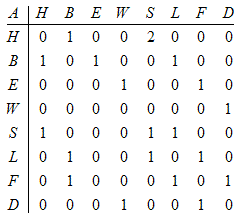
 Now figure out what these places are. The house is, well, your house. All the others, except W, are stores you need to go to: The sock shop (S), the book store (B), the library (L), the electronics store (E), the farmer’s market (F) and the drug store (D). The W is Will’s house. The next step is to write a matrix recording these relations. For each road from one place to another record a 1. If there is no connection put a zero. For a one-way street only write a 1 for the direction the arrow faces. If there are two options, say between home and the sock shop, enter a 2. This matrix will look like this.

Now we have this maps matrix. That was the hard part; now it’s quite simple. However many places you want to go to and raise the matrix to that power. (Note: This will give you all ways even if they repeat points. For the sake of this example you are very forgetful and often have to go back because you forgot many things at these stores.)

 Let’s go back to the trip to Will’s. You want to go to six places before you head over. Just raise the whole matrix to 6 and in the cell H,W you will see how many routes there are that reach Will’s in six moves. The resulting matrix will look like this:

Now look in the cell H,W and you will find out your answer. Even though most of the numbers are big, there are only 10 ways to get from your house to Will’s in 6 moves. This is the way adjacency matrices work. I hope this example has helped you understand these helpful matrices more fully.

Solving a systems of Equations with a Matrix


This post is a part of a series of guest-posts on the applications of matrix multiplication. These posts were written by my pre-calc students:

Systems of Equations Matrix Project
by Jake Melton

Matrices have many different applications and can be helpful in many situations. One such situation is solving systems of equations. Solving systems of equations using matrices takes several steps, all of which will be explained in the following blog post. All of the steps will be shown as if you were using a TI-89 calculator (or Mr. Roer's edits show steps for a TI-82, -83, -84). 

The following system of equations will be used as the example throughout the following post:

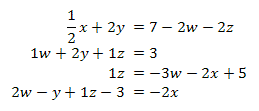
To begin the process we need to first write all of the equations in standard form (i.e. variables=number.) This will have to be done by hand. After we finish this process we get: 

Once we have written this new system of equations there are two ways we could go. First, we could complete the system of equations by hand. This process would include writing two matrices A and B. A would be a coefficient matrix, that is a matrix written using the number by which the variable is multiplied; this matrix would be 4 by 4. The second matrix, B would be a 4 by 1 matrix written using the answers. Remember, if there is no variable as seen in the second equation where there is no x, you must write a 0. The system of equations is then summarized by the matrix multiplication:

To find the solutions, you can simply multiply the inverse of A by B and the resulting 4 by 1 matrix would be the answers, illustrated here. 
*Note if the determinant of A equals zero the system has either no solution or many solutions. 

However, to solve the system of equations we could follow another much more simple process using our calculators. Using a TI-89 (or TI-82, -83, or-84) first press “on” and scroll up to the data/matrix editor  and press enter (or press 2nd Matrix). Select “new” then “matrix”. Next, enter the name you would like under “variable” and continue by pressing enter. The data should be empty, now simply enter your data into the table, making sure you enter a 4 by 5 matrix. This matrix is augmented [A|B] and will appear as follows. 

As you can see, this matrix is simply both matrices shown on the previous page combined. Now, simply press “enter” then “home”. Next you will need to click the “catalog” button found in the middle of your calculator, then press “2” and scroll to “rref(” and hit enter. (or press 2nd Matrix, over to calc, and down to B: rref ) Now you will need to enter the name of your matrix using “alpha” and the name of your matrix. The rref you just entered stands for “reduced row echelon form of a” or as Mr. Roer calls it, “really ridiculously easy form” and it simplifies the equations for you to give you:

Each row is a simplified equation. The first row simply means that 
1w +0x +0y +0z = 3.5  or, w = 3.5 

So now that you have found this matrix you can conclude that: 
w = 3.5 
x = -4 
y = -1.5 
z = 2.5 

These numbers shown above mean that w, x, y, and z are the only numbers that could be put into the original system of equations and make ALL of them true. And that is how you would go about finding the answer to a system of equations using matrices. Now you know how to solve these systems by hand or using your TI-89 calculator (or TI-82, -83, -84). Now use these steps to solve any difficult system of equations with ease. I hope you leave feeling enlightened and much smarter, or more confused, but hopefully the former.

Matrix Multiplication Cryptography

This post is a part of a series of guest-posts on the applications of matrix multiplication. These posts were written by my pre-calc students:

Matrix Cryptography
by David Stanley

Cryptography, put simply, is the art of encoding messages.  It serves to answer the simple question of how you get a message to a friend without your enemy being able to read it.  Cryptography has been used for centuries by militaries and intelligence agencies to send important messages, while insuring that the information the messages contain does not fall into enemy hands. 
Although there are many forms of cryptography, one of the simplest yet most effective forms of encryption still utilizes the simple matrix.The message is placed in matrix form, and then multiplied by a random square matrix or encoding matrix

 The first step is to write down the message that you wish to send.  I will use this completely true and totally non-brown nosing message as an example:

Mr Roer is the best math teacher ever in the history of humanity.

Secondly, you must create an encoding matrix.  This matrix must be a square matrix. An example of this would be:

In this kind of encryption, letters are assigned numbers for their place in the alphabet.  A would be 1, B would be 2, C would be 3 and so on.  Spaces are assigned the number 27, as their are only 26 letters in the alphabet.  So the message in matrix form would be:

Notice how my encoding matrix has the same amount of columns as the message matrix does rows.  This is required or else they cannot be multiplied.  All that is left to do is to multiply the encryption matrix by the message matrix.  This gives you:
Now if you received this in the mail, you would have no idea at all what it said.  In order to figure this out in a timely manner, you would have to have the decoding matrix.  The decoding matrix is the inverse of the encoding matrix.  This can easily be found on your calculator.  The decoding matrix for this problem is quite long, so I will round to four decimal places. 

The exact elements in the decoding matrix have more digits and would give the exact numbers as the original message. Using this rounded decryption matrix gives numbers that can all be rounded to the original message, though occasionally a letter might be slightly off.  

In summary, the encoding process written in calculator language when 
           [A] is the encoding matrix,
           [B] is the original message,  
    and [C] is the encoded message is [A]x[B]=[C]. 
The process of decoding the message is ([A]^-1)x[C]=[B]. 

And there you have it.  That is matrix cryptography in a nutshell. 

Meaningful Matrix Multiplication

This post is a part of a series of guest-posts on the applications of matrix multiplication. These posts were written by my pre-calc students:

The Christmas Party Competition by Kiera Suywn
Svetlana and Isabelle are frien-emies. Not only that, but they both love Christmas. Every year they each plan a Christmas party. This year their parties happened to be on the same day. So they are trying to beat each other out on who can get the best price for her party supplies. Svetlana needs 1 ½ gallon of eggnog, 6 twelve packs of candy canes, 3 gingerbread house kits, and 7 hot chocolate mixes. Isabelle needs 5 ½ gallons of eggnog, 2 twelve packs of candy canes, 7 gingerbread house making kits, and 4 hot chocolate mixes. They are both comparing prices from Meijer, Target, and Forest Hills Foods. To figure out who would have the best price at what store, they used matrices, something they learned a very long time ago in Pre-Calculus class and thought they would never use again.
Here is a chart showing the prices of the items per store. They put this as matrix [A] which is (stores x prices of food).

Eggnog
Candy Canes
Gingerbread
Hot Chocolate
Target
2.79
2.49
9.99
1.99
Meijer
2.19
2.00
9.99
1.39
Forest Hills
3.99
1.25
7.99
4.99
            The next matrix they made was one that showed the (food x people) this went in the matrix [B] spot. 

Svetlana
Isabelle
Eggnog
1
5
Candy Canes
6
2
Gingerbread house kit
3
7
Hot Chocolate
7
4

They multiplied these two matrices together which produced a (stores x people) matrix. This is what they got for their answers. This gave them the total amounts that each of their supplies would be.


Svetlana
Isabelle
Target
89.49
112.74
Meijer
73.35
101.56
Forest Hills Foods
70.39
98.34

Forest Hills Foods had the best prices for both of them but Svetlana won by $27.95. Maybe next year Isabelle!


Wednesday, November 21, 2012

Geogebra Activities In My Classroom

I have been spending a lot of time playing around with Geogebra lately -- in my algebra and precalc classes. I love this program because of how easy it is to make functions come alive and allow you to tweak things and see the effect they have. Below I have embedded an example of a geogebra activity I made to help illustrate how transformations change the graph of the basic sine curve.

Sorry, the GeoGebra Applet could not be started. Please make sure that Java 1.5 (or later) is installed and active in your browser (Click here to install Java now) If you can not see it, you might need to update or install Java on your computer. If you can see it, play around with the sliders in the corner -- move them and you will see how the graph adjusts. These are concepts that we delve out in more details of course in class, but this is a tool I use at the beginning of the unit to introduce the idea. It is also something I allowed as an option for my students to make at the end of the unit as an assessment of their knowledge. It takes minimal knowledge to create a graph that moves with sliders -- I can show a student how to do that in about two minutes.  But to add to the graph the other colored lines and line segments that make it so clear what a, b, c, and d do require more advanced programming thinking, and a strong knowledge of the keypoints that are on a graph.

I have made other geogebra activities too -- another of my favorites is to make a guessing game of graphs. By assigning some code to a button, you can have geogebra create a new random graph. So I do that, and then create another controllable graph and have the students try to match the random graph. Here is an example I just had my algebra students playing with the other day:
Sorry, the GeoGebra Applet could not be started. Please make sure that Java 1.5 (or later) is installed and active in your browser (Click here to install Java now)
After a quick demonstration in class, we moved the the computer lab and they spent some time playing around trying to type the equation of the blue line. I could have just given them a worksheet to do, (and seriously thought of it as bad as I was feeling yesterday with a pounding headache) but I preferred this activity instead. It was:

  • A change of pace and scenery
  • Motivating - there is something satisfying in "getting it!" 
  • Self-checking. I believe this is one of the most critical points of an drill-like activity in a math class. If students don't have instant feedback that they are doing something correct, or incorrect, they will quickly develop habits that are hard to undo.
If you are interested in learning more about creating geogebra activities like these, be sure to check out future posts.  
Related Posts Plugin for WordPress, Blogger...